Virtual move surveys, step by step
How a CubitMove survey becomes an estimate you can defend.
A CubitMove virtual move survey has four steps: you send a link, the customer records each room from their phone, CubitMove organizes it into a Move Report with cubic feet and access details, and your estimator reviews that report and prices the job in your own rates.
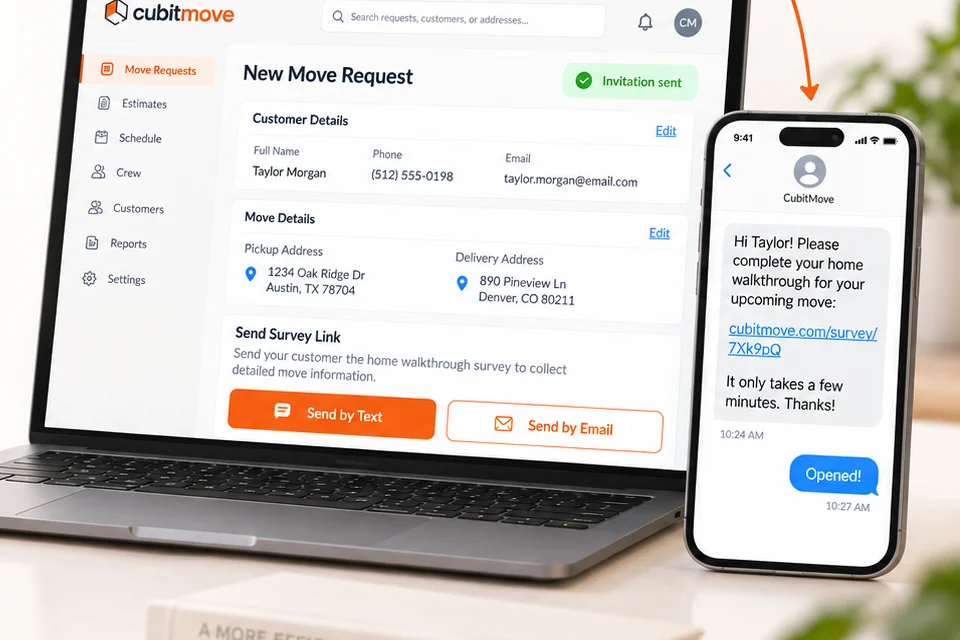
Send the survey link
From the dashboard, enter the customer’s name and mobile number and send. They get a text with a link to your company survey, carrying your logo. Send it during the intake call while you still have their attention — completion drops with every hour of delay.
You can also email it, or let the customer start from a button on your own website. Any of the three arrives in the same queue.
The customer records each room
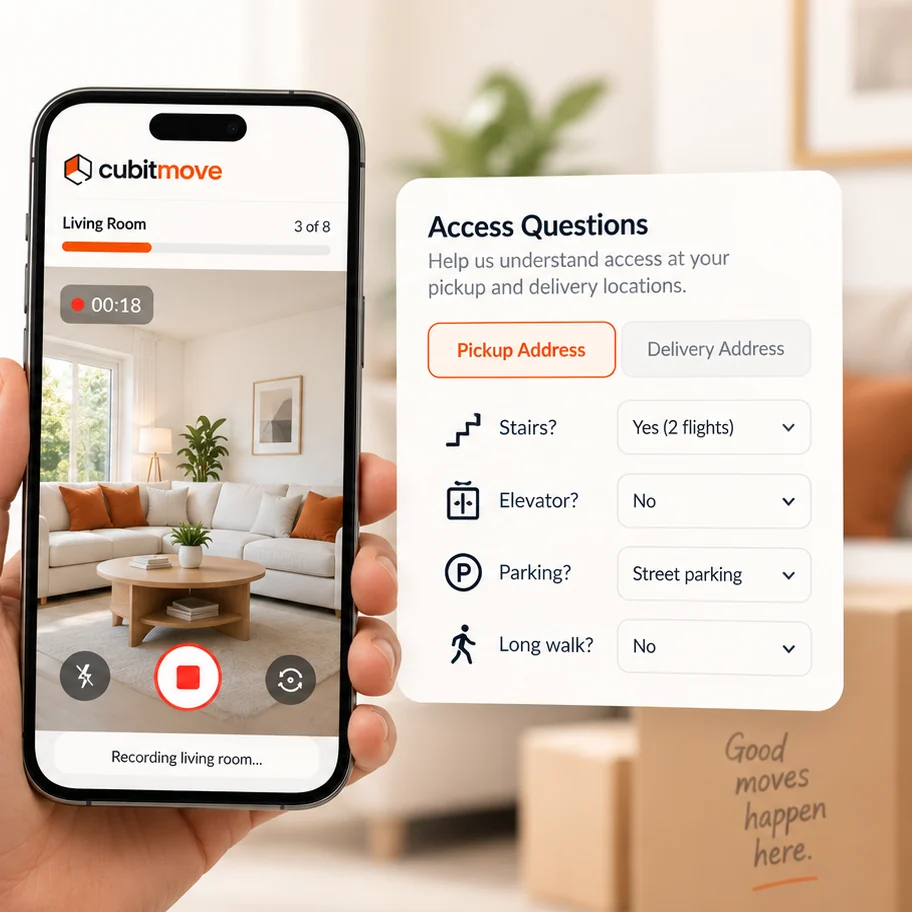
The link opens in the phone browser on iPhone or Android. There is nothing to download and no account to create. The survey names the rooms, and the customer pans slowly through each one — including the garage, the basement and the closets that hold what is not packed yet.
Then five questions about access at both addresses: stair flights, elevator type, carry distance from door to truck, parking and permits, and specialty items such as pianos, safes or gym equipment.
A typical two- or three-bedroom home takes six to ten minutes. They can stop after any room and resume later from the same link.
CubitMove builds the Move Report
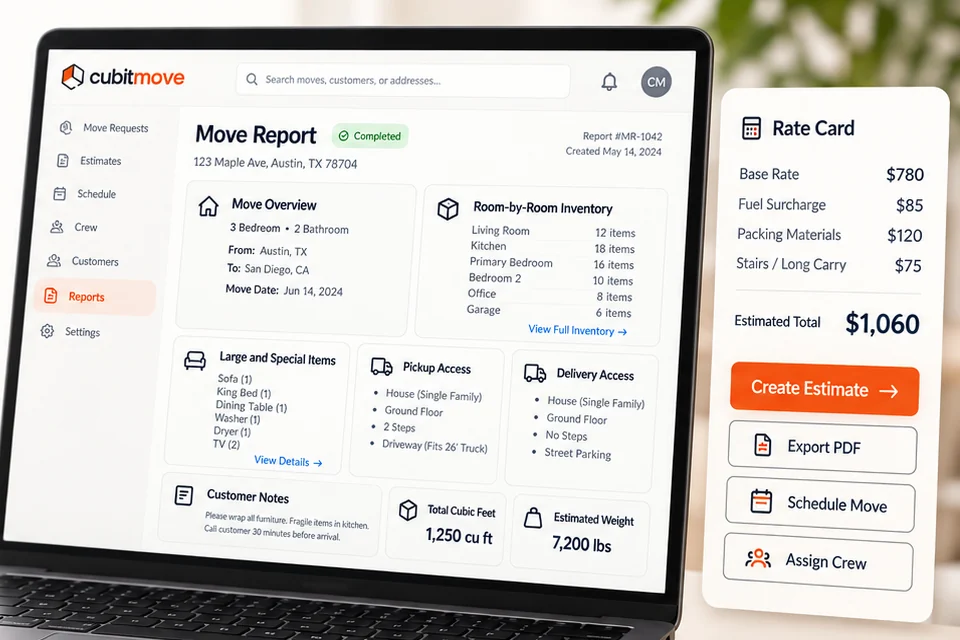
Items are identified from the footage and sized against standard cube sheet volumes — the same tables your estimators already work from. The result is organized by room: item, quantity, cubic feet, and a note where something needs disassembly or special handling.
Volume totals convert to estimated weight at 7 lb per cubic foot, the standard tariff factor. Access answers are attached alongside, so dispatch sees the load and the difficulty together.
Rooms that came through too dark or too fast are flagged, so your estimator knows which parts of the house to treat with suspicion rather than assuming the report is complete.
Your estimator reviews and quotes
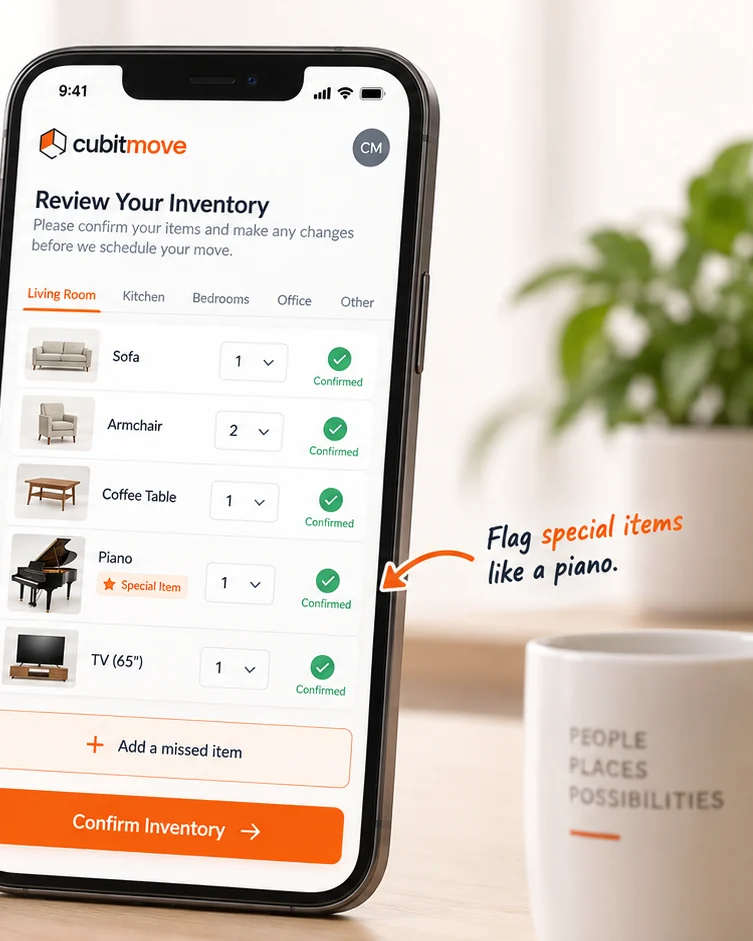
The report lands in your dashboard as ready for review. Every item, quantity and volume is editable: add the boxes the customer has not packed, correct a sofa that was recorded as a loveseat, drop anything not going on the truck.
Then price it in your own rates. CubitMove does not price moves and never shows a figure to your customer — the estimate that reaches them is yours, on your paper.
Export the finished report as a PDF for the job file, or as JSON into your CRM or dispatch software.
Where a virtual survey is not the right tool
Keep the in-home visit for the jobs that earn it.
CubitMove is built to remove the drive from routine estimates, not to argue that every estimate should be remote.
Large or high-value homes
Antiques, art, wine collections and custom crating need eyes and a hand on the item.
Interstate without a waiver
For interstate household goods, a written estimate must rest on a physical survey unless the customer waives it in writing. Keep that waiver on file.
Moves where the building is the job
A survey covers the contents of an office or commercial space well. Shared loading docks, freight elevator windows and a phased floor-by-floor sequence are not captured, so walk those yourself. See commercial movers for exactly what the survey does and does not ask.
Customers who ask for a visit
Some people want to meet the company that is taking their belongings. That is a sales opportunity, not an inefficiency.
Compliance details vary and change. Confirm current requirements in 49 CFR § 375.401 and with your own counsel — we are a software company, not your compliance adviser.
Operational questions
What movers ask about the process.
How long does the survey take a customer?
Most customers finish a two- or three-bedroom home in six to ten minutes, including the access questions. They can stop after any room and pick it up later from the same link.
What if the customer records badly?
CubitMove prompts them to slow down and pan the room, and flags rooms that came through too dark or too fast so they can redo just that room. If the report still looks thin, your estimator can see which rooms were rushed before quoting.
Who reviews the report before the customer sees a price?
Your estimator, always. CubitMove never sends a price to your customer. The report lands in your dashboard as ready for review, and every item, quantity and volume is editable before your estimate goes out.
Does a virtual survey satisfy the FMCSA physical survey rule?
For interstate household goods moves, a written estimate must be based on a physical survey of the household goods unless the customer waives it in writing. Many movers use a virtual survey as that documented alternative and keep the signed waiver on file. Confirm the current requirement in 49 CFR § 375.401 and with your own compliance counsel.
The next step
See it on one of your own jobs.
The fastest way to judge CubitMove is to run a move you have already completed through it and compare the report against your own invoice.